Mastering the Art of Celebration: A Comprehensive Guide to Graduation Alphabet 3D SVG Files
Graduation is one of life’s most significant milestones. It marks the culmination of years of hard work, late-night study sessions, and personal growth. For crafters, small business owners, and DIY enthusiasts, this occasion presents a unique opportunity to create memorable keepsakes that capture the spirit of achievement. However, creating professional-looking designs from scratch can be daunting, especially when you are trying to achieve complex visual effects like depth and dimension.
This is where Graduation Alphabet 3D SVG files come into play. These digital assets have revolutionized the way we approach custom crafting, allowing creators to produce stunning, layered designs with minimal effort. In this article, we will explore what these files are, why they are so effective, how to use them in popular software like Silhouette Studio and Cricut Design Space, and the myriad ways you can incorporate them into your projects.
Understanding the Basics: What is an SVG?
To fully appreciate the value of a 3D graduation design, it is essential to understand the format itself. SVG stands for Scalable Vector Graphics. Unlike raster images (such as JPEGs or PNGs), which are made up of pixels and lose quality when scaled up, vector graphics are built using mathematical equations. This means an SVG file can be resized to any dimension—from a tiny sticker on a water bottle to a massive banner on a wall—without any loss in clarity or sharpness.
For those who use cutting machines, SVG is the gold standard. It allows the machine’s blade to follow precise paths, ensuring clean cuts every time. When combined with a "3D" effect, an SVG file typically contains multiple layers of the same shape, offset slightly from one another. When cut from different colored materials and stacked together, these layers create an illusion of depth, making the text appear to pop off the page.
The Power of 3D Layering in Craft Design
Why choose a 3D alphabet over a flat design? The answer lies in visual impact. A flat letter is functional, but a 3D letter is an experience. By adding shadows, highlights, and physical depth, you transform simple text into a focal point. This is particularly important for graduation themes, where the goal is often to celebrate grand achievements.
Imagine a cake topper that reads "Class of 2024." In a flat design, the numbers might blend into the background. In a 3D design, each number is distinct, bold, and tactile. This added dimensionality not only looks more professional but also adds a tactile element that enhances the user's interaction with the object. Whether it is a shirt printed with vinyl or a card made from thick cardstock, the 3D effect draws the eye and invites touch.
Compatibility and Software Integration
One of the primary concerns for new crafters is whether their equipment can handle these intricate files. The good news is that the vast majority of modern cutting machines support SVG files natively. Two of the most popular platforms for utilizing these designs are Silhouette Studio and Cricut Design Space.
Using Silhouette Studio
Silhouette Studio users will find that importing an SVG is straightforward. Once imported, you can easily separate the layers if necessary, adjust the spacing between the 3D offsets, and assign different colors to each layer. This flexibility allows you to customize the gradient effect, choosing contrasting colors for a bold look or analogous colors for a subtle shadow effect.
Using Cricut Design Space
Cricut Design Space has become increasingly robust in its handling of vector files. When you upload a 3D SVG, the software recognizes the individual cut lines. You can then use the "Weld" or "Attach" features to ensure that all layers stay aligned during the cutting process. This is crucial for maintaining the integrity of the 3D structure. If the layers shift even slightly during cutting, the final stacked result may look misaligned.
Other Machines and File Formats
If you are using a different type of machine, please ensure you are able to use this type of file with your machine. Some older or specialized plotters may require conversion to other formats like DXF or AI. Always check your machine’s manual or consult with the manufacturer to confirm compatibility before purchasing or downloading digital assets.
What’s Included in the Download?
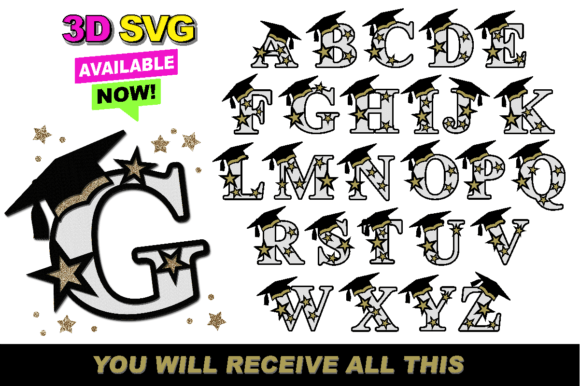
When you purchase or download a collection of Graduation Alphabet 3D SVG files, you are usually receiving a comprehensive package designed to save you time and maximize your creative potential. Typically, these downloads come in a zipped folder to keep the files organized and protected.
Inside this folder, you can expect to find:
- Multiple Color Variations: Pre-colored versions of the alphabet and numbers, such as navy blue, gold, black, and white, to match various school colors or party themes.
- Layered Source Files: The actual SVG files with separated layers, ready for cutting.
- Instructions: A brief guide on how to prepare the files for your specific machine, including recommended settings for blade pressure and speed.
- Commercial Use Licenses: Clear terms regarding whether you can sell items made with these designs, which is vital for small business owners.
Unzipping the folder is a simple step that reveals all the components you need to start designing immediately. Having everything in one place ensures that you don’t have to hunt through multiple tabs or emails to find the right font style or number set.
Practical Applications: Beyond the Party
While the name suggests a focus on graduation parties, the utility of these 3D alphabets extends far beyond a single event. Their versatility makes them suitable for a wide range of applications in both personal and commercial contexts.
Cake Toppers and Bakery Decor
Food-safe acrylic or cardstock cake toppers are a staple at graduation celebrations. The 3D effect adds height and elegance to the cake, making it stand out in photos. Because the letters are cut precisely, they fit together seamlessly, creating a polished look that elevates the entire dessert table.
Custom Apparel and Vinyl Prints
Printing shirts is a classic way to commemorate the occasion. Using heat transfer vinyl (HTV) or sublimation, you can apply the 3D design to t-shirts, hoodies, or caps. The layered effect creates a textured feel against the fabric, which is a delightful surprise for the wearer. This is especially popular for family members who want to show their pride by wearing matching outfits.
Stickers and Decals
Stickers are another excellent medium for 3D designs. By printing on adhesive vinyl or using a die-cutting machine, you can create durable stickers for laptops, water bottles, and planners. The 3D aspect makes these stickers visually striking, turning everyday items into personalized statements of accomplishment.
Birthday Celebrations and Milestones
Although tailored for graduation, these alphabets are not limited to academic success. They can be used for milestone birthdays, such as turning 18 or 21. The "Class of [Year]" aesthetic can be adapted to "Born in [Year]," providing a nostalgic touch for adult birthday parties. The adaptability of the design ensures it remains relevant across different types of celebrations.
Common Misunderstandings and Tips for Success
Even with high-quality files, mistakes can happen. Here are a few common pitfalls to avoid:
- Ignoring Material Thickness: When stacking 3D layers, the thickness of your material matters. If you are using thick chipboard, the gaps between layers should be wider than if you are using thin cardstock. Test a small sample first to determine the ideal spacing.
- Overlooking Weeding: Intricate 3D designs often have many small pieces. Take your time when weeding (removing the excess material). Rushing this step can lead to torn edges or missing details. Using a weeding tool with a fine tip can help.
- Neglecting Alignment: When assembling the layers, ensure they are perfectly centered. Using a registration mark or a light box can help you align the layers accurately before adhering them together.
Conclusion: Elevate Your Crafting Game
Incorporating Graduation Alphabet 3D SVG files into your workflow is a smart move for anyone looking to add a professional touch to their creations. These files bridge the gap between technical precision and artistic expression, allowing you to produce high-quality results without needing advanced graphic design skills. Whether you are preparing for a big ceremony, running a home-based business, or simply enjoying a weekend craft project, these versatile resources provide the tools you need to make every celebration unforgettable.
Remember to always verify your machine’s compatibility and take advantage of the included instructions. With the right preparation and a bit of creativity, your 3D designs will not just be seen—they will be remembered. So, unzip that folder, fire up your cutting software, and start creating something truly special today.