Customizable 3D FAMILY Tree Shadow Box
Creating a meaningful keepsake that captures your lineage is a rewarding endeavor, but the path from concept to physical object is often more complex than it appears. The Customizable 3D FAMILY Tree Shadow Box has emerged as a popular choice for crafters and designers looking to produce high-impact wall art or sentimental gifts. Unlike standard flat decals or simple printables, this digital multilayer file offers depth and dimensionality, transforming a basic paper cut into a sophisticated piece of decor. However, simply downloading a file does not guarantee success. Understanding the technical nuances of vector cutting, layer alignment, and material selection is crucial for achieving a result that looks professional rather than amateurish.
Understanding the Digital Asset
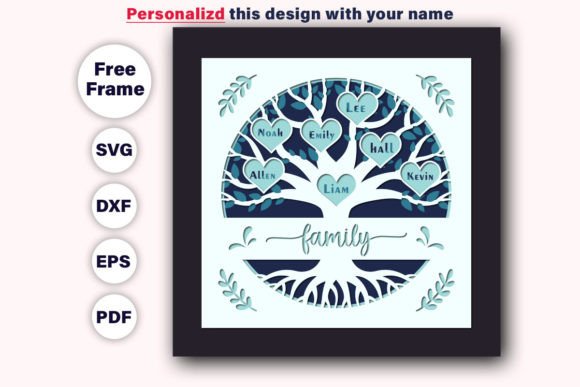
At its core, the Customizable 3D FAMILY Tree Shadow Box SVG is a multilayer paper cut file designed specifically for compatibility with cutting machines like Cricut, Silhouette, and other electronic die-cutting devices. It is not merely a single image; it is a structured collection of vectors that define how layers stack upon one another to create depth. When you purchase this digital product, you are receiving a comprehensive toolkit intended to streamline your crafting process. The package typically includes a variety of file formats to ensure versatility across different software environments.
A complete download usually contains a zip file featuring:
- 17 SVG files: Ideal for most modern cutting machine software, allowing for easy editing and layer separation.
- 17 PNG files: Useful for printing directly onto cardstock or for use in design programs that require raster images with transparent backgrounds.
- 17 EPS files: Essential for professional graphic design workflows and compatibility with Adobe Illustrator or CorelDRAW.
- 17 DXF files: A standard format for CAD and laser cutting applications, ensuring broad hardware compatibility.
- 17 PDF files: Perfect for viewing, archiving, or printing guides before committing to the cutting mat.
This multi-format approach ensures that whether you are a beginner using pre-loaded machine software or a pro designer working in Illustrator, you have the correct tools to execute the project. The files are prepared at an 8″x8″ size, providing a substantial canvas for detail while remaining manageable for home crafting setups.
Common Pitfalls in Layered Paper Cutting
One of the most frequent mistakes beginners make when working with 3D shadow box designs is underestimating the importance of layer registration. Because these designs rely on precise stacking to achieve their three-dimensional effect, even a millimeter of misalignment can ruin the visual impact. If you assume that all layers will automatically align perfectly when loaded into your machine, you risk creating a disjointed final product where branches do not connect seamlessly or names appear off-center.
Another oversight involves the assumption that "vector" means "unlimited resolution." While the files are indeed 100% vector and resizable without quality loss, scaling them up significantly beyond the original 8″x8″ dimensions can expose limitations in your cutting machine’s precision. Conversely, scaling down too much may cause intricate details—such as small text or delicate branch connections—to become fragile and prone to breaking during weeding (the process of removing excess material). It is vital to respect the inherent scale of the design unless you have advanced experience with fine-detail cutting.
Material selection is also a critical area where many users stumble. Using thin printer paper for a structural shadow box will result in sagging and poor definition. On the other hand, overly thick cardboard may prevent the blade from cutting through cleanly, leading to jagged edges or incomplete cuts. The weight of the paper must be balanced to support the weight of the upper layers while still allowing for clean, crisp cuts.
Optimizing Your Workflow for Success
To avoid these common errors, start by organizing your digital workspace. Before sending any file to your cutter, open the SVG in your preferred software and verify that all layers are grouped correctly. Check for duplicate lines or overlapping paths that might cause the machine to cut the same spot twice, which can weaken the material. Most cutting software allows you to assign different colors to different layers; use this feature to visually confirm that each distinct part of the tree—from the roots to the highest leaf—is assigned to its own cut job.
When preparing your materials, consider the aesthetic goals of your project. The Customizable 3D FAMILY Tree Shadow Box is versatile enough for various themes, including Thanksgiving, Christmas, or general holiday decor. For a festive look, you might choose warm autumn tones for a Thanksgiving display or traditional reds and greens for Christmas. However, remember that contrast is key. If your background layer is dark, ensure your foreground elements are light enough to stand out. This principle applies equally to window decorations, where natural light will backlight your creation.
Assembly requires patience. Do not rush the gluing process. Use a strong adhesive suitable for paper crafts, such as double-sided tape dots or a fine-tip glue pen, to apply adhesive only to specific contact points. This prevents glue seepage, which can mar the clean lines of your vector cuts. Work from the back layer forward, ensuring each tier is securely bonded before adding the next. This methodical approach maintains the structural integrity of the 3D effect.
Evaluating Value and Versatility
While the initial cost of a digital file is lower than purchasing a pre-made shadow box, the true value lies in its reusability and customization potential. You are not limited to a single design iteration. With the included editable files, you can change colors, resize elements, or even modify text to fit specific family members’ names. This flexibility makes it an excellent resource for entrepreneurs selling personalized gifts on platforms like Etsy, as well as hobbyists creating unique heirlooms.
Consider the broader applications beyond wall art. These multilayer files can be adapted for greeting cards, scrapbook embellishments, journaling accents, and even window clings. The ability to switch between SVG, PNG, and PDF formats means you can repurpose the same design for multiple projects throughout the year. Whether you are creating a Cyber Monday sale item, a Black Friday special, or a heartfelt gift for Mother’s Day, the underlying asset remains relevant and useful.
Final Considerations Before You Cut
Before diving into your project, take a moment to review your equipment settings. Ensure your blade is sharp and your mat is sticky enough to hold the paper firmly in place. Run a test cut on a scrap piece of your chosen material to check for tension and adhesion issues. This small step can save hours of frustration and wasted materials. Additionally, familiarize yourself with the specific requirements of your cutting machine regarding maximum sheet sizes and layer counts.
The Customizable 3D FAMILY Tree Shadow Box is more than just a collection of lines on a screen; it is a template for creativity and connection. By understanding the technical requirements, avoiding common alignment and material errors, and approaching the assembly with care, you can produce a stunning piece of art that honors your family history. The possibilities are endless, limited only by your imagination and your willingness to follow best practices in digital crafting.