3D Deer Lantern Laser Cut Files
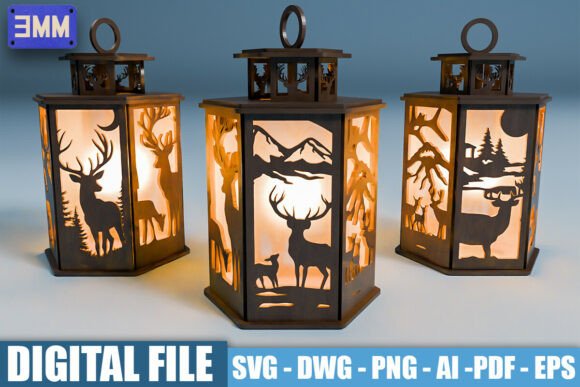
Creating custom decor that feels both rugged and refined is a popular goal for makers, but the path from digital file to physical object often has hidden pitfalls. 3D Deer Lantern Laser Cut Files offer a compelling solution for those looking to add nature-inspired elegance to their homes or businesses. These digital downloads provide everything needed to construct three distinct hexagonal lanterns, featuring intricate scenes ranging from a solitary stag in the mountains to a family group in the forest. However, simply downloading a file does not guarantee a successful project. Understanding the nuances of material compatibility, file formats, and assembly logic is critical to avoiding wasted time, money, and materials.
Understanding the Scope of the Project
Before diving into the technicalities, it is essential to understand what you are actually purchasing. This specific bundle includes designs optimized for 3mm material thickness. This detail is not merely a suggestion; it is a structural requirement. The interlocking tabs and slots designed into the hexagonal panels rely on precise tolerances. If you attempt to use 4mm acrylic or 5mm plywood without adjusting your machine settings or the file itself, the pieces will either not fit together or will warp under tension. Many beginners overlook this specification, assuming that "laser cut files" are universal across all stock sizes. They are not.
The collection features three unique designs, each telling a different story through laser engraving and cutting. The visual impact comes from the contrast between the darkened engraved areas and the light passing through the cutouts. When viewed from the outside, these lanterns cast dramatic shadows, transforming a simple wooden box into a piece of art. For entrepreneurs selling handmade goods, this versatility allows for a diverse product line without needing to design from scratch. For hobbyists, it offers a satisfying weekend project that results in a high-end looking gift.
Navigating File Formats Correctly
One of the most common mistakes when evaluating digital assets is ignoring the file format list. A package that claims to be comprehensive should offer flexibility. The inclusion of multiple formats—SVG, DWG, PNG, AI, PDF, and EPS—is a strong indicator of quality, but only if you know how to use them effectively.
- SVG (Scalable Vector Graphics): This is the gold standard for most modern laser cutters. It ensures clean, precise cuts because it uses mathematical paths rather than pixels. If your machine software prefers SVG, ensure your version is up to date to handle complex vector data.
- DWG: Essential for users working with CAD software like AutoCAD or LightBurn’s import tools. It bridges the gap between 2D drawing and 3D modeling preparation.
- AI (Adobe Illustrator): Fully editable files allow you to tweak details. Perhaps you want to resize the stag slightly or adjust the spacing between trees. Having the source file means you have control over the final aesthetic.
- PNG & PDF: While useful for previews or printing reference guides, these are raster or static formats. Do not attempt to send a PNG directly to a laser cutter expecting a perfect cut; the resolution limits will result in jagged edges.
A frequent error is assuming that an AI file can be opened in any free viewer without loss of data. Proprietary effects or layer structures might disappear if opened in incompatible software. Always check the preview images provided in the listing to ensure the complexity matches your machine’s capabilities.
Common Pitfalls in Material Selection
The success of a 3D deer lantern depends heavily on the substrate. Because the files are designed for 3mm thickness, you must select materials that burn cleanly and hold their shape. Plywood is a classic choice, but not all plywood is created equal. Softwoods like birch or poplar veneer plywood work best. Hardwoods may require slower speeds and higher power, which can lead to excessive charring around the delicate engravings of the deer antlers or fur details.
Acrylic is another option, particularly for a more modern look. Clear or frosted 3mm acrylic can create a stunning light-diffusing effect. However, acrylic requires different laser parameters than wood. Using wood settings on acrylic can cause melting and fire hazards. Conversely, using acrylic settings on wood may result in incomplete cuts. Always perform a test run on a small scrap piece of your chosen material before committing to the full set of panels.
Another overlooked detail is the finish. Raw wood can look unfinished once assembled. Applying a matte sealant or a light stain before assembly can enhance the grain and protect the lantern. If you choose to paint, ensure the paint is thin enough not to clog the fine cut lines. Thick paint layers can fuse the moving parts or obscure the intricate laser-cut details of the mountain landscape.
Assembly Logic and Structural Integrity
Hexagonal lanterns rely on friction and precision. The files include clear cut and engrave lines, but they do not include explicit assembly instructions in every download. Users must infer the structure based on the geometry. A common mistake is assembling the panels in the wrong order, leading to a misaligned final product. Take time to lay out all pieces flat before starting. Identify the base, the sides, and the top cap.
Ensure that the tab orientation is consistent. In some designs, tabs face inward or outward depending on the panel’s role. Mixing these up can prevent the lantern from closing properly. Use tweezers for removing small waste pieces from the engraved areas, such as the eyes of the deer or individual blades of grass. Rushing this step can damage the fragile surrounding material.
Evaluating Value and Usability
When considering whether to purchase these files, look beyond the price tag. Consider the variety included. Three distinct designs mean you can create a matching set or mix and match for different rooms. The ability to customize via the AI and EPS files adds significant value for professional designers who need to brand their creations. For educators, these files serve as excellent examples of geometric construction and vector art in STEM classes.
Check the community feedback if available. Look for comments regarding print clarity and ease of use. Are there reports of missing layers? Is the support responsive? A good provider will offer guidance if you encounter issues with your specific laser cutter model. This support network is invaluable when troubleshooting unexpected burning patterns or alignment errors.
Final Recommendations for Success
To ensure your 3D Deer Lantern Laser Cut Files result in a magnificent finished product, follow these practical steps. First, verify your material thickness is exactly 3mm. Second, choose the correct file format for your software—SVG for direct cutting, AI for editing. Third, run material-specific tests to dial in your power and speed settings. Finally, take your time during assembly, checking each joint for a snug fit before moving to the next.
By avoiding these common traps and respecting the technical requirements of the design, you can produce lanterns that are not just decorations, but heirloom-quality pieces. Whether you are gifting them to wildlife enthusiasts or displaying them in your own cabin, the effort put into getting the details right will shine through in the final glow of the light.