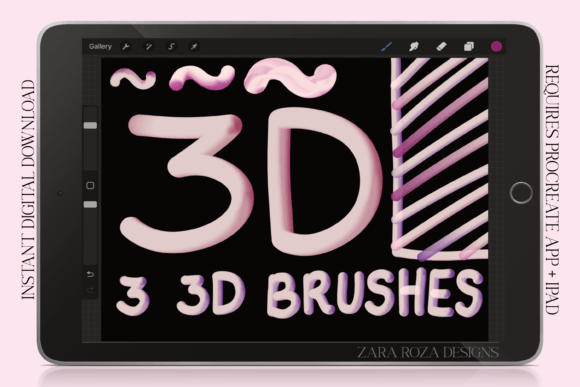
3D Brush Set - Procreate Monoline Pens
Digital art has evolved significantly, moving beyond simple flat vector lines into spaces where texture and depth define the aesthetic. For artists working on the iPad, specifically those using the Procreate app on an iPad Pro, finding tools that bridge the gap between traditional hand-drawn charm and modern digital efficiency is key. This is where the 3D Brush Set - Procreate Monoline Pens steps in. It is not just a collection of strokes; it is a stylistic toolkit designed to give your line art a distinct, tactile presence without the need for complex shading layers or manual gradient work.
This digital download provides a curated set of six brushes: three specialized 3D monoline brushes and three pressure-sensitive pen variations. The core appeal lies in their ability to create a shine and shading effect directly through the stroke itself. By leveraging the power of color blending within Procreate, these brushes allow you to generate a retro, grunge, or vintage aesthetic instantly. Whether you are sketching a quick idea or finalizing a piece of fan art, these pens offer a unique way to add dimension to your work.
The Aesthetic Appeal of 3D Monoline Art
Monoline art, characterized by consistent line weight, has seen a resurgence in popularity across social media platforms and print-on-demand products. However, flat monoline can sometimes feel sterile. The 3D Brush Set - Procreate Monoline Pens addresses this by introducing a subtle yet effective volumetric quality. The "shine" and "shading" mentioned in the brush description refer to how the tool interacts with two selected colors. When you pair a darker shade with a lighter one, the brush simulates light hitting a cylindrical object, creating a pseudo-3D tube effect.
This technique is particularly effective for styles that demand a hand-drawn, imperfect feel. Think of the grungy, textured look of 90s comic books, the soft curves of boho kawaii illustrations, or the bold outlines of webcomics. The brushes retain the organic jitter and variation of a real marker or pencil, preventing the digital line from looking too clean or robotic. This makes them ideal for artists who want their digital work to feel authentic and grounded in physical media traditions.
Real-World Applications Across Creative Industries
The versatility of these brushes means they serve a wide array of creative professionals and hobbyists. Here is how different users might integrate the 3D Brush Set - Procreate Monoline Pens into their workflows:
- Webcomic and Manga Artists: Creating consistent line art for panels can be time-consuming. These brushes speed up the outlining process while adding a stylized depth that makes characters pop against solid color backgrounds. The pressure variations allow for dynamic line weights, essential for conveying motion and emotion in anime-style drawings.
- Fashion and Character Designers: When sketching fashion flats or character concepts, designers often need to convey fabric texture or material quickly. The grunge and vintage aesthetic of these pens can simulate ink on paper, helping designers present rough sketches that look finished and intentional rather than temporary drafts.
- Food Illustrators and Bakers: There is a growing trend in digital illustration for recipe blogs, cookbooks, and dessert packaging. The soft, rounded nature of the 3D monoline effect mimics the smoothness of icing or frosting. Artists can use these brushes to outline cute desserts, baking ingredients, or clay pottery textures, adding a whimsical, kawaii touch that appeals to food lovers.
- Holiday and Seasonal Graphic Design: During peak seasons like Halloween, Christmas, or New Year, content creators flood social media with themed graphics. These brushes are perfect for creating quick, eye-catching holiday cards, Instagram stories, or merchandise designs. The retro vibe fits well with vintage holiday aesthetics, while the 3D effect adds a festive pop of dimension.
- Journaling and Planning Enthusiasts: Digital planning is huge among adults aged 20–50. Users can incorporate these brushes into their digital planners on the iPad to create unique headers, doodles, and decorative elements. The hand-lettering capability allows for personalized touches in daily logs, making the planning process more enjoyable and visually engaging.
How to Maximize the 3D Effect
One of the most common questions new users have is how to get the full benefit of these brushes. The magic happens in the setup. Because this is a digital file requiring the Procreate App, you have control over the color palette. To achieve the prominent 3D effect, you should select two colors from your palette before drawing. The strategy is simple: choose one color that is significantly darker and another that is much lighter.
For example, if you want a classic black-and-white 3D look, use dark charcoal and off-white. If you prefer a pastel kawaii style, try a deep mauve paired with a pale pink. As you draw, the brush blends these two tones along the stroke, creating the illusion of light reflecting off a curved surface. This method is far faster than manually painting highlights and shadows on separate layers, allowing you to maintain a fluid, uninterrupted drawing flow.
Considerations for Digital Buyers
Before purchasing, it is important to understand the nature of the product. This is an instant digital download. No printed or physical product will be sent or mailed. You will receive a brushset file (.brushset) containing the six brushes. Once downloaded, you can import them directly into your Procreate library on your iPad or iPad Pro.
Compatibility: Ensure you have the latest version of Procreate installed. While the brushes are designed for general use, the best experience comes from devices with Apple Pencil support, as the pressure sensitivity features rely on the nuanced input of the stylus. The three pressure pen variations included in the set respond to how hard you press, giving you natural control over line thickness, which is crucial for expressive lettering and rough sketching.
Licensing: Typically, these brush sets come with a license for personal and commercial use, meaning you can sell prints, t-shirts, or digital products featuring art created with these tools. Always check the specific terms provided with your download, but generally, the creativity you produce is yours to monetize.
Why Choose This Tool?
In a market saturated with generic brushes, the 3D Brush Set - Procreate Monoline Pens stands out due to its specific focus on aesthetic depth and retro charm. It solves the problem of flat, boring line art without requiring advanced technical skills. For busy artists, students, and hobbyists, it offers a shortcut to professional-looking results. The combination of grunge texture, 3D shading, and pressure sensitivity makes it a versatile addition to any digital artist’s arsenal.
Whether you are illustrating a beloved fan art character, designing a logo for a small business, or simply enjoying a relaxing evening of digital painting, these brushes provide the right amount of friction and feedback to keep the process engaging. They encourage experimentation with color and form, inviting you to explore new styles in your artwork.
Getting Started
To begin using the 3D Brush Set - Procreate Monoline Pens, simply import the .brushset file into Procreate. Open a new canvas, select one of the monoline brushes, and pick your two-tone color scheme. Start with loose gestures to get a feel for the pressure response, then move into detailed outlining. Don’t be afraid to layer strokes or vary your colors to see how the 3D effect reacts differently. Happy drawing!